Kafka Backups: What to Save and How to Restore It
A Kafka broker loses a disk. Another replica takes over, and the replacement broker copies the missing data from the surviving replicas. Nobody downloads a backup.
That is what replication is for. With sensible settings and replica placement, broker failures should be routine operational work. But change a topic's retention from seven days to one hour, and the same healthy cluster will happily delete data you still need.
Before choosing a backup tool, it helps to separate these two situations.
Which failures does Kafka already handle?
Take a topic with replication factor 3, producers using acks=all, and min.insync.replicas=2. Place the replicas across three availability zones and keep unclean leader election disabled. Losing one replica should not lose acknowledged records; the remaining replicas can continue serving the partition. Losing a zone also requires the controller quorum to survive, so its placement matters too.
One detail in the Kafka configuration is easy to miss: acks=all waits for all current in-sync replicas. The minimum of two is the threshold below which writes are rejected, not an instruction to acknowledge after exactly two copies.
These guarantees have boundaries. Three replicas on three servers in the same building still share a physical failure domain.
On March 10, 2021, a fire at OVHcloud's Strasbourg site mostly destroyed SBG2 and damaged part of SBG1. The incident report describes a failure that affected whole facilities. More replicas inside an affected facility would not have solved it. A backup stored there could have disappeared too.
For regional failures, Kafka deployments can use a remote cluster with asynchronous replication or a carefully designed stretched cluster. The former leaves a window of records not yet copied; the latter can put WAN latency and availability on the acknowledgement path. I covered these choices in the guide to Kafka disaster recovery and multi-region architectures.
A backup offers another option: restore into replacement infrastructure. That takes longer than failing over to a running cluster, but may be sufficient when the application can tolerate the downtime.
The cluster is healthy, but the data is gone
Suppose a deployment accidentally changes orders retention from seven days to one hour. By the time someone notices, Kafka has removed older segments. Reverting the setting stops further damage; it does not recover those segments.
Other incidents have the same shape: a topic is deleted, a producer emits incorrect tombstones into a compacted topic, or compromised credentials allow someone to destroy data. Replication cannot distinguish an authorised mistake from an intended operation.
A second cluster may help, depending on what it replicates and how long it retains data. It is not automatically an independent historical copy. Topic configuration, deletion propagation and retention need checking for the particular replication mechanism.
Nor does putting the live log in object storage automatically give you a backup. Tiered and diskless storage still manage the live dataset and its lifecycle. Recovery from an earlier state needs data retained independently of that lifecycle.
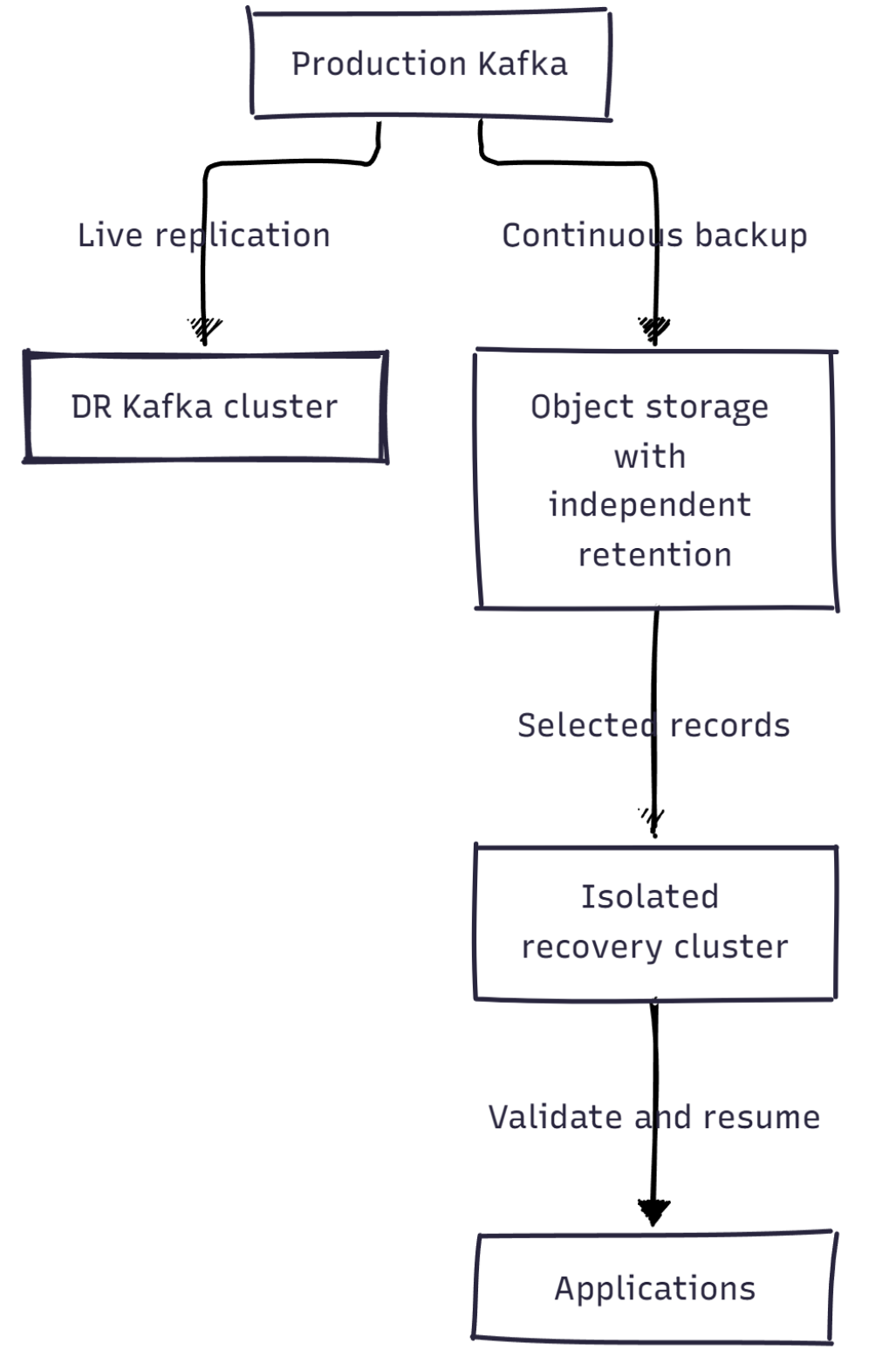
The backup must have captured the records before they disappeared. Starting a sink after retention or compaction has removed them is too late.
Using Kafka Connect for backups
Kafka Connect with an object-storage sink is a reasonable starting point. It consumes records and writes files outside the cluster. The question is whether those files contain everything the application needs when the records come back.
Confluent provides sink/source pairs for Amazon S3, Google Cloud Storage and Azure Blob Storage. The sink exports records to object storage; the source reads them back into Kafka. Preserving partitions and order depends on the format and partitioner, and the restore path delivers at least once, so consumers must tolerate duplicates. Record coverage also needs checking: the documented S3 Backup and Restore Source does not restore keys or headers exported by the sink.
Licensing differs between the two directions. For example, the self-managed S3 Sink uses the Confluent Community License, while the matching Backup and Restore S3 Source requires a subscription after its 30-day trial.
Confluent Cloud has full-record backup and restore modes, currently documented for the GCS Sink and Source pair. These preserve keys, values, headers and record metadata, with schema handling determined by converter configuration. Byte-preserving mode does not also back up schemas. Restore reads the configured storage prefix, so selecting a particular time range requires preparing that prefix rather than simply supplying a timestamp filter.
There are also dedicated tools and interfaces around this process:
| Option | What it provides | What to account for |
|---|---|---|
| Confluent S3 connector pair | A Connect-based export and restore path | Format, partition layout, duplicates and application recovery remain part of your design. |
| Kannika Armory | Commercial Kubernetes-based backup and selective restore, with schema backup support | Consumer-position recovery is a separate procedure. |
| OSO Kafka Backup | An MIT-licensed engine covering records, topic configuration and consumer-offset recovery | Schema Registry backup and restore belongs to its Enterprise edition. |
| Lenses Backup & Restore | A UI that configures Lenses S3 sink/source connectors | It still runs through Kafka Connect; useful if you already operate that stack. |
For a few topics with straightforward serialization, a tested connector setup may be enough. Selective recovery, schema remapping and repeatable restore jobs are reasons to consider a dedicated product.
Recovering the missing orders with Kannika
Kannika is worth a closer look here. Confluent featured it in a webinar about migration, backup and restore. Armory runs on Kubernetes and supports S3-compatible storage, Google Cloud Storage and Azure Blob Storage, among other backends.
Return to the retention mistake. Assume a continuous backup has already captured the missing orders and retained them independently. After fixing the configuration, I would restore into a separate topic or cluster first.
Kannika's restore configuration supports selecting topics, restricting records by time or offset, and mapping them to different destination topics. Its schema mapping can rewrite embedded schema IDs when the destination registry assigns different IDs. These features help recover a specific dataset without writing a custom reader for the backup files.
There is an important limit: producing records back into Kafka gives them new offsets. Keeping an original offset in a header does not make it the destination offset. A consumer that previously committed offset 500,000 cannot blindly reuse that number.
Kannika documents a separate consumer-group migration procedure using kbridge. That procedure reads committed positions from the source cluster. If the source has been destroyed, those positions must have been captured beforehand, or recovery needs an explicit replay policy. A successful migration between two running clusters does not establish that the same procedure works after losing one of them.
Resuming consumers after restore
Restoring orders does not undo payments or shipments already triggered by those records. Start by restoring into an isolated environment, with production payment and shipping APIs blocked. Check the recovered data and run consumers against test substitutes for those services.
Before replaying records in production, establish how the application handles operations that have already completed. For example, a payment handler should use a stable payment ID and a durable record of completed payments to prevent another charge for the same operation.
If the application has no duplicate protection, do not replay the restored topic into production consumers yet. First reconcile the recovered orders with the payment and shipping systems and identify which operations actually remain unfinished.
Test the restore with the source unavailable
An empty recovery environment exposes missing pieces quickly: schemas, topic settings, permissions, service identities and encryption keys. Some belong in the backup tool; others can be recreated from infrastructure as code. The procedure needs both.
Check representative records, including headers, null values and tombstones. Keep the intended partition count and ordering. Review destination retention too: restoring old timestamps into a topic with short retention can make the recovered records eligible for deletion immediately.
Storage isolation matters just as much. A backup in another region helps with regional loss. Separate credentials and protected retention help when production credentials are compromised. S3 Object Lock can prevent protected object versions from being deleted, but an ordinary S3 bucket does not enable that protection automatically.
Measure recovery against the application:
- RPO: how much data can be lost since the last durably captured record? Include consumer lag and files waiting to be uploaded.
- RTO: how long until the application works again? Include provisioning, loading data, restoring access and restarting consumers safely.
A topic reproducible from another protected source may need little additional protection. The only retained history of business events deserves a different plan. Decide this per dataset, then run a restore with the original cluster unavailable.
There are two kinds of people: those who make backups and those who will. I would also put a restore drill in the calendar.
Reviewed by: Grzegorz Kocur