Reliable Message Delivery: the Transactional Outbox Pattern With Okapi
While working on a project with the team, we kept running into the same small but stubborn problem. We would save something to the database, and then need to notify another service about it with a webhook, a Kafka event, or a downstream call. The trouble is that "save to the database" and "notify the other service" don't share a transaction. Calling the downstream inside the transaction and a slow or flaky service drags your write down with it. Do it after the commit, and a crash or a dropped connection leaves you with the row saved, but the notification is never sent.
This is the dual-write problem, and the fix has been understood for years: the transactional outbox pattern. Instead of calling the downstream directly, you write the message to a table in the same transaction as your business data, and a separate process delivers it afterward. The transaction gives you atomicity; the background processor gives you eventual delivery. We won't re-explain the pattern here. We covered it, along with the inbox side and the trade-offs, in the Microservices 101: Transactional Outbox and Inbox article. This post assumes you know its shape and asks a narrower question: what do you actually add to a Kotlin service to get it? We'll walk through a Spring Boot app, because that's where this problem usually comes up, but the library itself isn't tied to Spring.
We did what most teams do first: we hand-rolled an outbox. It worked, so we extended it over time, and eventually it was solid enough that we started wondering whether anyone else could use it. Our stack was Kotlin-native, so before reinventing more of it, we looked for an existing library and came up short. There were pieces here and there, but nothing established that fit the way a Kotlin service actually wants to work. So we took what we had built and turned it into okapi: a small Kotlin library for the transactional outbox pattern, with Postgres and MySQL storage and HTTP and Kafka delivery. On Spring Boot it is mostly autoconfiguration, and in a Kotlin service without Spring you assemble the same pieces by hand, which we'll come back to at the end. In this post, we'll show what it does and exactly what changes in your code when you add it.
What's in the box
Okapi is a handful of small modules with one rule: everything depends on a framework-agnostic core, never the other way around. The core holds the abstractions, the publisher that writes entries, the store that persists them, the deliverer that sends them, the retry policy, and the background scheduler, and it knows nothing about your database, your transport, or your framework. Everything else plugs into it. In a picture:
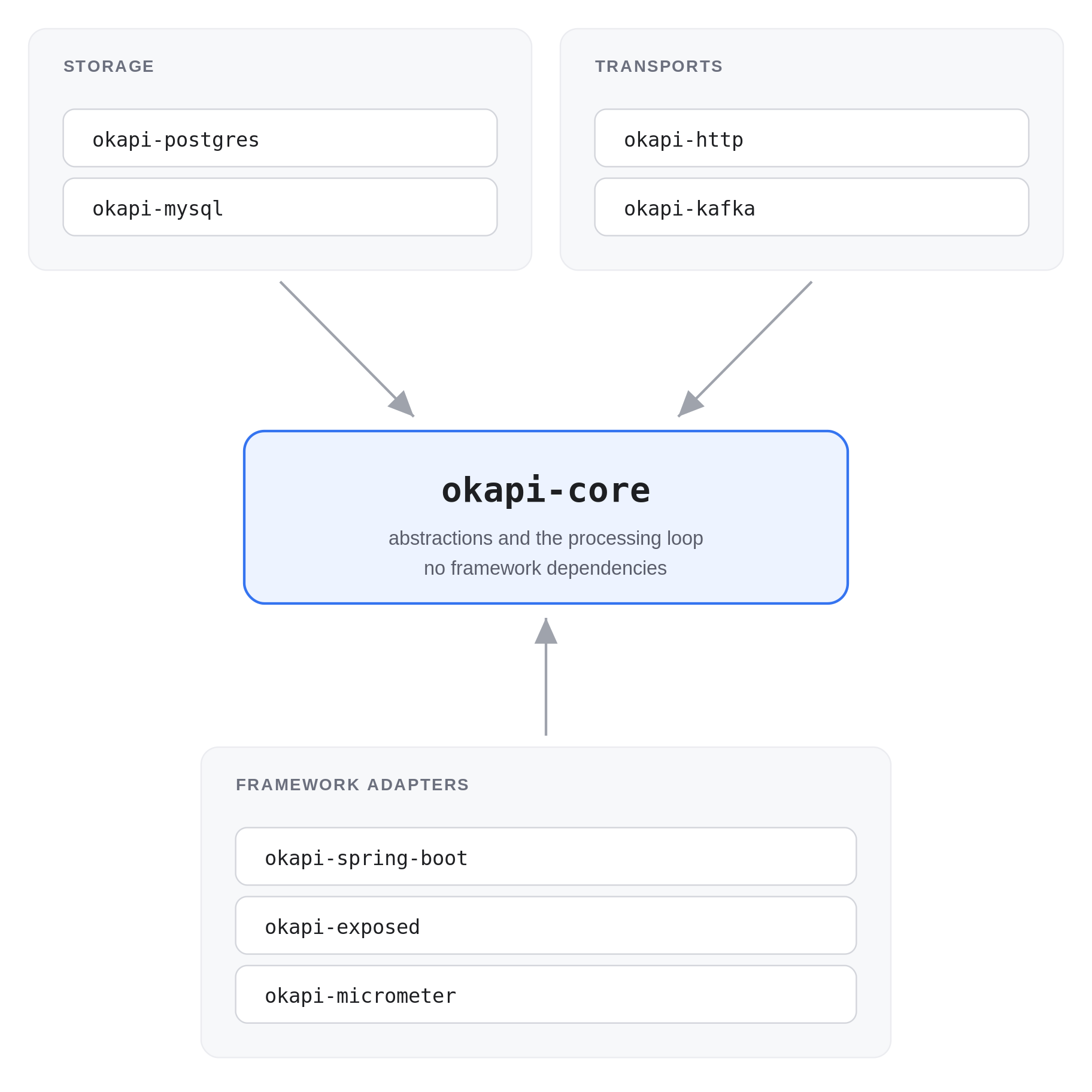
okapi-spring-boot knows how to wire the storage and Micrometer modules, but it doesn’t pull them into your build: you add the ones you want and its autoconfiguration detects what’s there. okapi-bom aligns the versions of every module above; okapi-integration-tests and okapi-benchmarks are internal and not published.
That split is deliberate. Different projects have different needs, so we wanted the pieces to be something you assemble rather than a monolith you adopt. You pick a storage module (okapi-postgres or okapi-mysql), one or more transports (okapi-http, okapi-kafka), and, if you're on Spring, okapi-spring-boot for autoconfiguration. There's a Micrometer module for metrics. And because the core carries no framework dependencies, you can also wire it by hand in a plain Kotlin service with no specific framework at all.
The runtime model is easy to hold in your head. When you publish, okapi writes a row to the okapi_outbox table within your transaction. A background processor polls that table, delivers each pending row to its transport, and marks it delivered, or retries it. That's the whole loop. The one new thing in your database is that table:
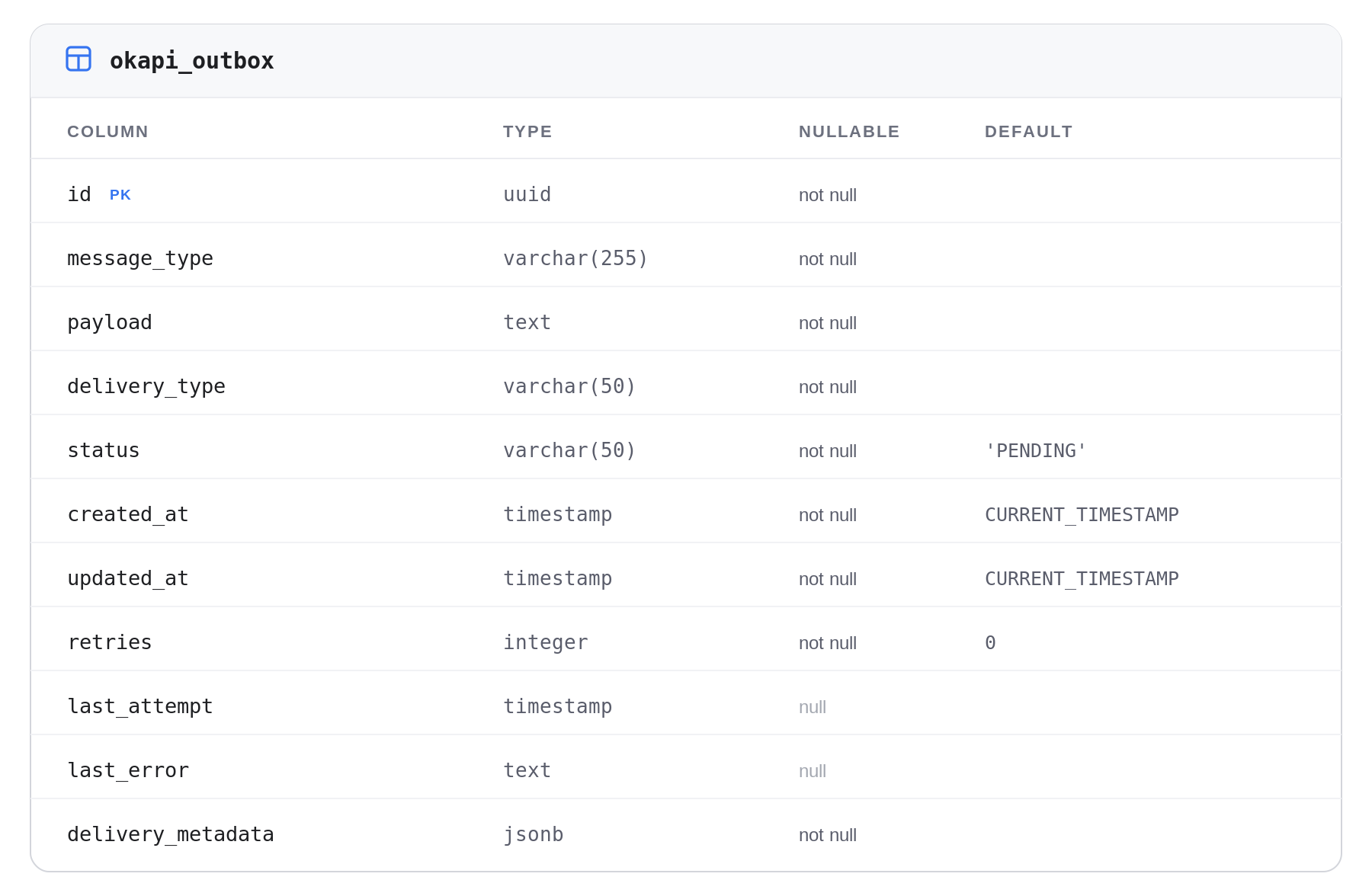
A row is one pending delivery: what to send (payload, message_type), how to send it (delivery_type, delivery_metadata), and where it is in its life (status, retries, last_error). On top of this okapi gives you at-least-once delivery, which brings us to the one thing worth knowing before you wire it in.
A few deliberate choices
The most important one: okapi is at-least-once, not exactly-once. It helps to keep the two halves of that apart. On the publishing side, nothing is lost: once the message is committed to the outbox, it is as durable as the order row next to it, and if the app goes down a second later, the processor picks it up when it comes back. On the delivery side, there is no such certainty. If the processor sends an HTTP request and then crashes before it can mark the row delivered, it has no way to know whether the request was received, so after the restart, it sends it again. That isn't a rough edge we haven't sanded down; it's inherent to reliable delivery. The consequence is that your consumers need to be idempotent, able to handle the same message twice without double-counting. That's the same responsibility the inbox pattern handles on the receiving side. One practical note: okapi sends your payload and the headers you configure, nothing more, so whatever the consumer deduplicates on has to be something you put there yourself, a business key in the payload, or the OutboxId that publish() hands back.
The rest are choices we would make the same way again. Okapi delivers by polling the table rather than tailing the database log. That costs a little latency: the processor wakes up once a second by default, so a message waits somewhere between no time at all and a full second before its first delivery attempt. In exchange, there's nothing new to run: no change-data-capture connector, no broker, just one more table in the database you already have and a background thread in the service you already deploy. The polling queries are the price of that, and okapi.processor.interval is there when you want the wait shorter. And it ships with Postgres and MySQL storage today; other databases come down to implementing one clean interface. None of this is a sacrifice so much as a shape: a small, boring library that leans on your existing database instead of asking you to run more infrastructure.
One thing okapi doesn't promise is ordering. The processor claims pending rows oldest first, so on a quiet system, messages tend to go out in the order they were published, but that's a property of the claim query rather than a guarantee. A delivery that fails is retried on a later tick, so a message published after it can reach the downstream first. Deliveries also run in parallel by design: the HTTP transport fires a whole batch with sendAsync before awaiting any of it, okapi.processor.concurrency fans a single tick out to several workers, and every extra instance of your service claims a batch of its own. If strict ordering is a hard requirement, this isn't the primitive to lean on.
How to use it
Here's what actually changes in a Spring Boot and Postgres service. We'll start from an app that already saves an order, and add a reliable notification to it.
First, the dependencies. Okapi publishes a BOM so the module versions stay aligned. Add it and the modules you want:
implementation(platform("com.softwaremill.okapi:okapi-bom:1.0.0"))
implementation("com.softwaremill.okapi:okapi-core")
implementation("com.softwaremill.okapi:okapi-postgres")
implementation("com.softwaremill.okapi:okapi-http")
implementation("com.softwaremill.okapi:okapi-spring-boot")
That's the first pleasant surprise: adding okapi to the classpath is enough for it to set up its own schema. If you use Liquibase, okapi-spring-boot runs its own bundled changelog on startup and creates the okapi_outbox table for you, with no edits to your master changelog and no manual SQL. It tracks its migration in its own tables, so it runs alongside your existing migrations rather than tangling with them. Start the app, and the table is simply there. That convenience is Liquibase-specific: the autoconfiguration only activates when Liquibase is on the classpath, so a Flyway application starts up perfectly happily, it just doesn't get the table for free. What okapi would have run is an ordinary 001__create_okapi_outbox_table.sql shipped inside the storage module, so with Flyway you point your own migrations at it and carry on. There's nothing about the pattern that resists Flyway; the equivalent auto-setup simply hasn't been built yet.
Next, the one thing okapi needs from you: a deliverer. Okapi discovers MessageDeliverer beans on the context and routes each entry to the one that matches its delivery type. Since we're delivering over HTTP, we hand it the okapi-http deliverer plus a ServiceUrlResolver that maps a logical service name to a base URL, so deployment topology lives in configuration rather than in the code that publishes:
@Configuration
class DeliveryConfig {

    @Bean
    fun serviceUrlResolver(
        @Value("\${webhooks.notifications-base-url}") notificationsBaseUrl: String,
    ): ServiceUrlResolver = ServiceUrlResolver { serviceName ->
        when (serviceName) {
            "notifications" -> notificationsBaseUrl
            else -> error("No base URL configured for service '$serviceName'")
        }
    }

    @Bean
    fun httpMessageDeliverer(urlResolver: ServiceUrlResolver): MessageDeliverer =
        HttpMessageDeliverer(urlResolver)
}
Now the part that matters. Our OrderService.placeOrder used to just save the order:
@Transactional
fun placeOrder(request: PlaceOrderRequest): Order {
    val order = Order(
        id = UUID.randomUUID(),
        customerId = request.customerId,
        totalAmount = request.totalAmount,
        createdAt = Instant.now(),
    )
    return orderRepository.save(order)
}
To notify the downstream reliably, we inject SpringOutboxPublisher and publish in the same method, right after the save:
@Transactional
fun placeOrder(request: PlaceOrderRequest): Order {
    val order = Order(/* … */)
    orderRepository.save(order)

    outboxPublisher.publish(
        OutboxMessage(
            messageType = "OrderPlaced",
            payload = objectMapper.writeValueAsString(order),
        ),
        httpDeliveryInfo {
            serviceName = "notifications"
            endpointPath = "/webhooks/orders"
            httpMethod = HttpMethod.POST
        },
    )
    return order
}
That's the whole change to your business code: one more constructor argument and one publish() call. The order row and the outbox row are written in the same transaction, so they commit together or not at all. (If you're on Spring Boot 4 like the demo, inject the Jackson 3 tools.jackson.databind.json.JsonMapper. Boot 4 moved its default JSON mapper to Jackson 3, so the old Jackson 2 ObjectMapper is no longer an auto-configured bean.)
Hit the endpoint, and you can watch the row go through its states:
SELECT message_type, delivery_type, status, retries FROM okapi_outbox;It shows up as PENDING immediately, and flips to DELIVERED on the processor's next poll, which, with the default one-second interval, usually means a few hundred milliseconds later, and the webhook has landed downstream. From your code's point of view, you saved an order; the delivery just happened, reliably, on its own.
Heads up: when delivery fails, okapi classifies the failure. An HTTP 5xx (or a 429, a 408, or a connection error) is a retriable failure: the entry stays
PENDING, its retries counter climbs, and the processor tries again on the next poll. Afterokapi.processor.max-retries(default 5), it gives up, and the row becomesFAILED, which is the initial attempt plus five retries, six in all. Any other response, a plain 4xx, say, is a permanent failure: no retries, straight to FAILED. The transport decides which is which, so the core never has to guess. Both halves are configurable: HttpMessageDeliverer takes the set of retriable status codes as a constructor argument if your downstream uses them differently, and okapi.processor.max-retries changes the budget.Watch out:
SpringOutboxPublisherwill throwIllegalStateExceptionif you callpublish()outside an active read-write transaction. That is on purpose, and it's the entire point of the pattern. If the outbox write can't commit atomically with your business data, there's no guarantee left to offer, so okapi refuses rather than letting you create a silent consistency bug you'd find in production three weeks later.
Other ways to plug it in
The demo uses Postgres and HTTP, but the modules swap cleanly:
- MySQL instead of Postgres. Swap
okapi-postgresforokapi-mysql. Same auto-configured schema story, and MySQL 8+ supports the concurrent-claim locking okapi relies on. - Kafka instead of, or alongside, HTTP. Add
okapi-kafka, provide aKafkaMessageDelivererbean with your producer, and publish with the matching builder:kafkaDeliveryInfo { topic = "order-events" }. Same publish call, different transport. Registering more than one deliverer just works, since okapi routes each entry by its delivery type. If you need to fan one event out to several destinations, a broker like Kafka is the natural fit. - Metrics.
okapi-micrometerexposes counters and gauges (delivered, retried, failed, queue depth) through Micrometer, so the outbox shows up on your existing dashboards. - No Spring.
okapi-corecarries no framework dependencies, so any Kotlin service can use it directly: a Ktor app, a worker, a CLI tool. What you give up is the autoconfiguration, so you assemble the pieces yourself. Create the store, the deliverer, and the processor, start anOutboxScheduler, and hand it aTransactionRunner: a one-method interface that wraps a block in whatever transaction mechanism you already use (okapi-exposedprovides one for Exposed). You also point your own Liquibase setup at okapi's bundled changelog instead of getting the schema for free on startup. First-class Ktor support and coroutine-friendly APIs are on the roadmap rather than shipped today.
Where it stands, and what's next
Okapi is at version 1.0.0, and that number is deliberate: it's the first stable release, so the public API follows semantic versioning from here, and breaking changes will only ever ship in a new major. It's genuinely useful. It covers the common cases (Postgres and MySQL, HTTP and Kafka, Spring Boot autoconfiguration, metrics, and plain-Kotlin usage). We've verified the entire flow end-to-end and are testing it in one of our projects.
We hope it proves as useful to other teams as it has been for us. If you're hitting the dual-write problem on a Spring Boot and Postgres stack, give okapi a try in a side project or a branch of your current one. It's on GitHub and Maven Central (com.softwaremill.okapi:okapi-bom:1.0.0), Apache-2.0 licensed, and issues and pull requests are open. The roadmap doesn't stop at 1.0.0, so stay tuned, and we'd love to hear what does and doesn't fit your shape of problem.
Reviewed by Rafał Maciak, Emil Bartnik