
Compaction & Retention: Edge Cases That Make Your Kafka Lag Metrics Inaccurate
Your dashboard shows 5 seconds of lag for the inventory-updates consumer. Everything looks fine. But users keep complaining about stale data – they're seeing 10-minute-old inventory counts.
You double-check the metrics. Still 5 seconds. The numbers say you're nearly caught up.
The numbers are lying.
After the last article where I explained why time lag matters more than offset lag, I need to clarify it: even an accurate time lag can mislead you. Two Kafka features – log compaction and retention – can delete the very messages your metrics depend on, causing reported lag to be significantly lower than reality.
Check out our new tool - a high-performance Apache Kafka consumer group lag exporter written in Rust. It calculates both offset lag and time lag (latency in seconds) with accurate timestamp-based measurements. You can find it on GitHub.
Let me show you how this happens and what you can do about it.
Quick Recap: How Time Lag Works
Time lag calculation is straightforward in theory:
time_lag = current_time - timestamp_of_message_at_committed_offsetTo get that timestamp, we seek the consumer's committed offset and read the message there. Simple.
But what if that message no longer exists?
Kafka doesn't throw an error. It silently returns the next available message instead. That message has a later timestamp, which means our calculated lag looks smaller than it actually is.
Think of it like measuring how far behind a runner is by checking their last checkpoint marker. If someone erased markers 1 through 10, and the next visible marker is 11, you'd record them at checkpoint 11 – even if they're really back at checkpoint 1.
This is exactly what happens with compaction and retention.
Log Compaction Problem
Log compaction is a Kafka feature for topics configured with cleanup.policy=compact. Instead of keeping all messages, Kafka retains only the latest message for each key, deleting older versions.
This is perfect for use cases like:
- Change Data Capture (CDC) streams
- KTable backing topics
- Configuration or state stores
Here's how compaction changes your partition:
Before compaction:
  offset 100: key=user-1, value={"status":"active"},   ts=10:00:00

  offset 101: key=user-2, value={"status":"pending"},  ts=10:00:15

  offset 102: key=user-1, value={"status":"inactive"}, ts=10:00:30  ← newer user-1

  offset 103: key=user-3, value={"status":"active"},   ts=10:00:45
After compaction:
  offset 101: key=user-2, value={"status":"pending"},  ts=10:00:15

  offset 102: key=user-1, value={"status":"inactive"}, ts=10:00:30

  offset 103: key=user-3, value={"status":"active"},   ts=10:00:45

  (offset 100 is gone - compacted away)
The Lag Problem
Now imagine your consumer committed offset 100 before the compaction ran. You want to calculate time lag:
- Seek to offset 100
- Kafka can't find offset 100 (it's been compacted)
- Kafka returns offset 101 instead
- You read the timestamp 10:00:15
- If the current time is 10:01:00, you report 45 seconds of lag
But the consumer is actually at offset 100, which was produced at 10:00:00. Real lag is 60 seconds – 25% higher than reported.
In this simple example, the error is small. In production, it can be massive.
Real-World Impact
Compacted topics often have slow-moving consumers. A classic example: rebuilding a KTable from the beginning. Your consumer might be at offset 0, slowly processing through millions of messages while compaction continuously deletes old data behind the latest offset.
Possible scenario:
- Reported time lag: 30 seconds
- Actual time lag: 30 minutes
The consumer was rebuilding the state from scratch on a heavily compacted topic. Thousands of early messages had been compacted away, so every timestamp lookup returned a message much more recent than the consumer's actual position.
Retention Deletion: When Your Offsets Fall Off the Cliff
While compaction removes specific messages (older values for the same key), retention deletes messages from the beginning of the log based on time or size limits.
The default policy (cleanup.policy=delete) removes messages after retention.ms expires or when retention.bytes is exceeded. Deletion always happens from the oldest messages first.
Day 1 (7-day retention configured):
  low_watermark = 0

  offset 0: ts=Day1 09:00

  offset 1: ts=Day1 09:01

  offset 2: ts=Day2 10:00

  ...

  high_watermark = 1000
Day 8:
  low_watermark = 500  ← moved forward!

  offset 500: ts=Day2 12:00  ← now the earliest message

  ...

  high_watermark = 5000

  (offsets 0-499 deleted by retention)
The Lag Problem
If your consumer committed an offset 50 before those messages were deleted:
- Consumer's committed offset: 50
- Kafka's low watermark: 500 (offsets 0-499 are gone)
- You try to seek to offset 50
- Kafka returns an offset 500 instead
- You read the timestamp from Day 2, not Day 1
- Reported lag is off by at least a day
Why This Happens
Common scenarios leading to retention-based inaccuracy:
- Consumer stopped for days or weeks – Someone turned it off during a migration and forgot to turn it back on.
- Slow consumer on high-volume topic – Processing can't keep up, and old messages age out before being consumed.
- Consumer offset reset to 0 – Intentional replay, but older messages already deleted.
In all these cases, your time lag metric will dramatically understate how far behind the consumer really is.
Detection: How klag-exporter Catches These Lies
The good news is that both conditions are detectable. You just need to compare what you asked for with what Kafka actually returned.
Compaction Detection
requested_offset = committed_offset

actual_offset = offset_of_returned_message

if actual_offset > requested_offset:

    # Gap detected - compaction removed messages

    compaction_likely = true
When we seek to offset 100 but get back offset 101, we know something was compacted away.
Retention Detection
This one is even easier – we already fetch the low watermark (earliest available offset) as part of normal operation:
if committed_offset < low_watermark:

    # Consumer's position is before the earliest message

    retention_affected = true
If your committed offset is 50 but the low watermark is 500, those messages are simply gone.
What klag-exporter Exposes
The klag-exporter tracks both conditions automatically:
Per-partition labels on lag metrics:
kafka_consumergroup_group_lag_seconds{..., compaction_detected="true"} 45.2

kafka_consumergroup_group_lag_seconds{..., retention_detected="true"} 120.5
Detection counters:
kafka_lag_exporter_compaction_detected_total 12

kafka_lag_exporter_retention_detected_total 3
These counters increment each time we detect either condition during a scrape. If they're non-zero, you know some of your time lag numbers are unreliable.
What to Do About It
Let's take a look at what solutions we have.
Mitigation for Compacted Topics
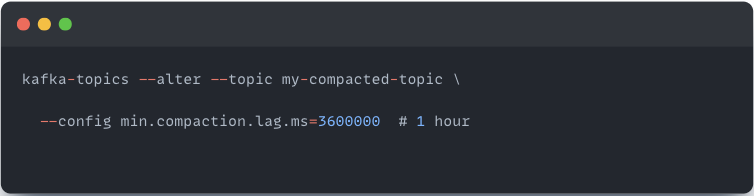
The easiest and most straightforward thing to do is to increase min.compaction.lag.ms, this will, of course, delay compaction, giving your consumers more time to catch up before messages disappear. Default is 0 (immediate eligibility).
Another way is to ensure consumers keep up - If your consumer regularly falls behind compaction, fix the consumer (scale it, optimize it, or give it more resources).
Last but not least, you can accept the limitation – for compacted topics, treat time lag as "at least this long" rather than an exact measurement.
Mitigation for Retention-Affected Consumers
If a consumer's offset is behind the low watermark, you have bigger problems than inaccurate metrics.
The most important one is that the consumer has missed data and those messages are gone forever. You need to decide if that's acceptable or if you need to replay from another source. You can, of course, move on and continue from what’s available, but more importantly, investigate what the root cause of this was, why the consumer fell so far behind (like it was stopped or too slow), and then fix the underlying issue.
For Monitoring Dashboards
When detection flags are set:
- Show offset lag as the primary metric (it's still accurate)
- Display time lag with a warning indicator
- Make it obvious that the number is a lower bound
Log compaction and retention can delete messages your consumer hasn't processed yet. When this happens, time lag metrics understate the problem-sometimes dramatically. The klag-exporter detects both conditions and flags them, so you know when to investigate rather than blindly trusting the numbers.
Now that you understand both the benefits of time lag and its limitations, you're ready to deploy klag-exporter in your environment. The Hidden Problem with Kafka Lag Monitoring article walks through everything from a quick Docker setup to production Kubernetes deployment with authentication.