
My Way Toward Agentic Coding

My initial interest in AI appeared pretty early. I remember participating in a conference in Belgrade in 2016, where there was a lot of talk about chatbots and how they would change the world.
That's also where I learned about IBM's Watson - one of the first AI tools, though back then we didn't call them that yet.
First steps
I remember my first attempts to use Watson to connect it with our company bot to improve communication. These were clumsy attempts to adapt AI to what I wanted to achieve, and not being an ML engineer, I simply didn't understand many concepts. It wasn't a system for everyone - you needed a certain level of ML knowledge to use it.
I remember being amazed by AI's capabilities when ChatGPT was released. I guess I wasn't the only one who was fascinated by how powerful AI could be. Comparing the experience of using Watson to ChatGPT's capabilities was like switching from a Maluch to a Polonez (that's a Polish joke - both are old Polish cars, but the Polonez was better).
ChatGPT just worked - you asked a question and got an answer, without any complicated programming tricks - a tool for the people!

I immediately connected our company bot to improve its "intelligence". And this integration worked perfectly for casual conversations. You could ask questions directly from our Slack and have a discussion with the bot in a thread, which is still happening today.
However, I was missing some contextual knowledge about what the bot itself could do - and it had several functions supporting our company's work. Attempts to customize ChatGPT to better understand our company's specifics were just as difficult as earlier with Watson.
But ChatGPT's capabilities related to generating code (back then still in the chat window), knowledge related to explaining code complexities, especially in a language I didn't know (I was learning TypeScript at the time), amazed me.
Of course, I quickly realized that AI makes mistakes or, as it's now called, hallucinates. The generated code, after pasting it into the IDE editor, turned out to be faulty, wouldn't compile, etc. So I would go back to the chat window and painstakingly try to get the correct result, copying successive versions of code into the editor and checking if they worked.
It was a phenomenon for me to discover that ChatGPT could generate Python code and run it. This allowed me to speed up work by generating a solution in Python, testing it on ChatGPT's side, and then converting the solution to TypeScript through AI - it worked rather poorly, as you can imagine. But it allowed me to experiment faster with what works and what doesn't, and if I remember correctly, this capability still exists.
AI-assisted coding
Perhaps the biggest excitement came when Copilot released a plugin for IntelliJ IDEA, which allowed direct integration with AI, whether through chat or through code completion. The productivity boost was mind-blowing, like good wine.
With a few keystrokes, you could generate dozens of lines of code. Entire functions and classes appeared as if by magic, thousands of lines of code in a few minutes, plus generating unit tests that verified everything. The feeling of being empowered by AI's capabilities only grew - everything seemed possible.
But reality hit quickly, and I got a serious headache...
The generated code was good quality but very naive in implementation when the problem was more complex. AI liked to fall into "repetition loops" of what was already in the code, successive functions were actually copies of existing code, and pressing "Tab" too quickly caused long minutes of painstakingly deleting unnecessary or repeated fragments. Productivity went downhill fast. Eventually, I turned off this functionality, which was more distracting than helpful for writing good code.
The next step in developing my AI skills was using Claude Code. And that was another milestone in code generation. AI no longer naively suggested code fragments or generated sections of code based on my prompt. You could describe the problem, provide context (like a specific file with a class), or indicate where it should draw "inspiration" from.
Claude Code spent time preparing TODO lists - the famous TODOs that other providers later copied. Having a task list, it would stop and ask if this was what I wanted to receive, if the prepared proposal met my requirements. This was incredible because it gave a sense of control over what AI generates. Finally, it wasn't just random code scattered everywhere, but a real action plan that so closely resembled what we do daily - planning tasks in a sprint or backlog.
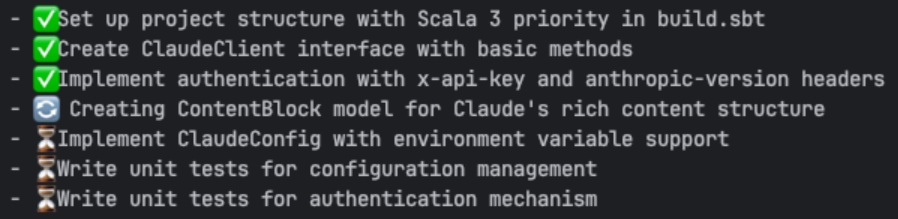
However, even here I hit a "wall" with prompting. Continuing previous sessions to complete a larger feature became less effective over time. The amount of accumulated information in context caused the AI itself to "drift away," but it was also hard for me to figure out what we were actually implementing now, where we were with our plan - to put it bluntly, we were "lost in the woods" - another Polish saying. Prompting didn't work for more complex problems.
Context is everything
Understanding how AI works, or rather what prompts are generated by the agent before we write our prompt, is fundamental to understanding how we can control the tool's behavior. Our prompt is only a component of what the agent has already prepared. This is clearly visible when you use the /context command in Claude Code:
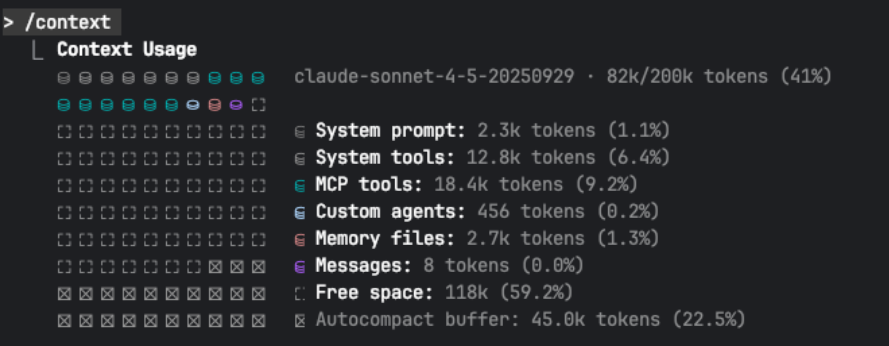
I haven't even written a word and the context is already 40% full - I particularly recommend paying attention to the System prompt and System tools, over which we have no control. We can define MCP servers or subagents ourselves and have control over them.
Similarly, the CLAUDE.md file depends only on us what's in it. You can find system prompts for various agents online, and I recommend familiarizing yourself with them to understand how our prompts can influence AI behavior. And remember that AI is not deterministic - its operation always has a certain degree of randomness.
Thanks to this knowledge, I started spending more time preparing the right prompt, especially if the task required more than writing a few functions and unit tests. My prompts increasingly started with the need to generate a plan and refine it before allowing the Agent to generate code. I outlined requirements, what I needed and what could be skipped.
Telling AI what you don't need is equally important - AI has a perfect ability to "drift" with requirements. Implementation plan, migration plan, time estimates for a non-existent team - AI will generate all of this if you don't forbid it. You don't even have to ask for it - it will appear casually in your perfect plan and disrupt it - because these are "garbage" that unnecessarily "distract" AI from what's most important.
Plans are important, but following the plan is more important
I think the title above explains everything. Having a ready plan, I would give it to AI to implement - after all, having a plan, it will follow it and won't "get lost". I was convinced that at this stage, the machine would do its work according to the given program, because that's how I treated the plan.
Did I mention that AI is not deterministic? I'll write it again - it's not, and even the best plan can be twisted and important parts can be skipped. Why does this happen? Because of context - our plan is added to the context, expanding its content like the System prompt and others.
Over time, responses generated by AI also end up in the context - code fragments, internet queries, responses with documentation content. Thousands of lines of text that have little to do with our plan. Our plan is diluted by the "noise" generated by the agent. All this noise causes AI to stop "understanding" what's important. Stopping and clearing the context won't help here, because if we start with the plan from scratch, "noise" will be generated again, and it will be different noise than before, so the results will be different - simply "complete chaos".
The solution turned out to be dividing the implementation into phases. However, for this to happen, the plan itself had to contain steps on what should be implemented and in what order. To prepare a plan with division into phases, I had to properly limit the scope and eliminate unnecessary elements. Limiting what the plan contains and what AI should focus on is as important as accurately describing requirements.
Clearly stating that I don't need time estimates for my team or AWS infrastructure costs, or deployment and migration plans, allowed me to narrow the plan down to just focusing on coding.
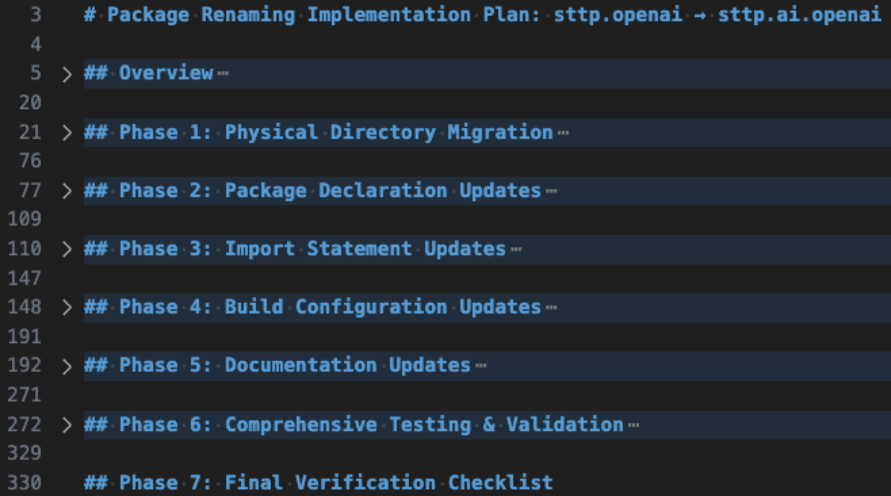
Currently, more and more is being said and written about Spec-Driven Development. Of course, it's nothing new, but in the context of using AI, it has enormous significance. Preparing a concise PRD document and then preparing a technical specification based on it allows you to get much better results than just writing a good prompt.
Tool makers have also noticed this, promoting this approach or providing tools like Spec Kit or OpenSpec. We create clear instructions for AI and document our project. Just a bit more and ADR will also be created this way to be easily "digestible" by AI.
Of course, this approach works best for greenfield projects, but you can also implement Spec-Driven Development in brownfield projects and benefit from it - it will be a better solution than tediously perfecting our prompts.
Continuous development
I came to many of the above conclusions mainly through trial and error, experimenting with different techniques in projects and confronting my ideas with others at the company.
It would be much better if there was an opportunity to immediately draw knowledge from people who have already experienced the above problems and have ready answers. Training courses are obviously such an answer, but currently there are thousands of AI-related training courses on the market, and it's hard to choose one that meets our requirements.
I'm lucky to work at a company that strongly emphasizes development and promotes participation in training. Additionally, Łukasz Biały and Tomasz Godzik conducted the Efficient Programming in Scala with Friendly Agents workshop at this year's Scala Days.
Then they conducted the same workshop internally for people from VirtusLab and SoftwareMill. If I had to summarize the knowledge gained from the workshop in one sentence, it's everything I figured out myself over the last 6 months and described in the above paragraphs.
At the workshop, we focused on the practical use of AI tools in a Scala programmer's daily work. We covered topics related to automation, scripts, writing prompts, and how to sensibly use agents and various solutions supporting code creation and refactoring.
We also discussed the real capabilities of large language models and their impact on a programmer's work, showing how not to fall for popular AI-related myths. Together we tested AI workflows, integrated tools, and even tried to automate migrations of larger Scala projects - all in an atmosphere of experimentation and knowledge exchange. A very well-invested 2x 8 hours of my time. If you have the opportunity to participate in this workshop, I encourage you to do so.
Another type of training is participation in the 10xdevs online course (the training is in Polish) - this is the second edition, and the previous one received very good reviews. I'm currently in the middle of this course, and it's already hard to tell how much I have learned.
However, the scope of material we're covering and the introductions to successive parts of the material strongly overlap with my experiences and very often expand my knowledge in areas that I thought I already understood well. A lot of emphasis is placed on creating good prompts (prompt engineering) or preparing plans for AI.

Summary
AI development today is more dynamic than the JavaScript ecosystem's development back in the day, when every week a new framework or library appeared. Currently, it's hard to keep up with all the tools appearing on the market. And the ability to use LLM models provided by major players gives everyone the opportunity to create various tools.
Every now and then, new ideas and new approaches appear on how AI can be used in a programmer's work. And I'm only focusing on my "bubble," driven by other programmers, while the same progress occurs in every area, from generating text and images to creating full-length films.
The flood of tools and information related to AI is overwhelming. However, to stay at the front of the pack, each of us must develop, try new tools, and experiment. People used to mock IDE users - only a good and fast editor mattered - but the world moved forward, and using an IDE is no longer a luxury.
It will be the same with AI in our work as programmers - these aren't "bells and whistles" (though some look like it), it's a tool that's constantly evolving.